

How to Optimize Videos for Your Website: Speed, SEO & Engagement




TL;DR: Key Takeaways
- Optimizing videos for your website improves page speed, user experience, and SEO ranking — all essential to modern video marketing success.
- Compress your videos, use the right formats (MP4, WebM), and host them on a fast CDN or external platform like YouTube or Vimeo.
- Add metadata, captions, and schema markup to help search engines index your videos.
- Prioritize lazy loading and responsive design for mobile visitors.
- An optimized video doesn’t just look good — it performs, attracting and converting more visitors.
What Does It Mean to Optimize Video for Your Website?
When marketers talk about how to optimize video for website, they usually mean one of two things:
- Making videos load faster and smoother without breaking the site, and
- Ensuring those videos boost search visibility and conversions instead of hurting performance.
In practice, video optimization is the process of preparing and embedding videos in a way that maximizes speed, quality, SEO, and engagement.
That matters because while video is one of the most effective tools in modern marketing, it’s also one of the heaviest. Large, uncompressed files can slow down your pages — and in Google’s eyes, a slow site equals poor experience.
Here’s the balance: great visuals, tiny load times.
According to Forrester, web pages that include a video are 53× more likely to rank on Google’s first page. But a 1-second delay in load time can reduce conversions by 7% (Akamai). So every second counts.
Optimized video keeps your site fast and helps it rank — a double win that’s essential in 2025’s attention economy.
Why B2B and B2C Businesses Need Interactive, Optimized Videos
No matter if you’re a B2B SaaS company or a lifestyle eCommerce brand, people prefer watching over reading. But attention spans are short — and unoptimized videos can ruin the experience before it even starts.
In B2B, optimized videos simplify complexity. Instead of forcing prospects through a 10-minute demo, short embedded clips can show how a product works or highlight key benefits instantly. Video is now a core part of B2B sales enablement — 71% of B2B marketers use it in their strategies (WebFX) — and most report higher conversion rates when videos load quickly and display well on all devices.
In B2C, consumers expect visual storytelling. They want to see a product in motion, not scroll through paragraphs. A Wyzowl report (2025) found that 91% of businesses use video marketing, and 88% say video delivers positive ROI. But here’s the catch — that ROI drops sharply when videos buffer or autoplay poorly.
Optimized video bridges this gap:
- It makes your website faster.
- It ensures consistent quality across desktop and mobile.
- And it helps Google understand your content through structured data, improving SEO visibility.
In short, optimized video is good marketing. It’s how you transform visuals from decoration into measurable business assets.
What Does It Mean to Optimize Video for Your Website?
To optimize video for website, you’re not just making it smaller — you’re making it efficient. An optimized video is one that:
- Loads quickly across devices and networks.
- Maintains clarity and doesn’t look pixelated.
- Doesn’t slow down your page performance.
- Improves SEO signals through proper markup and metadata.
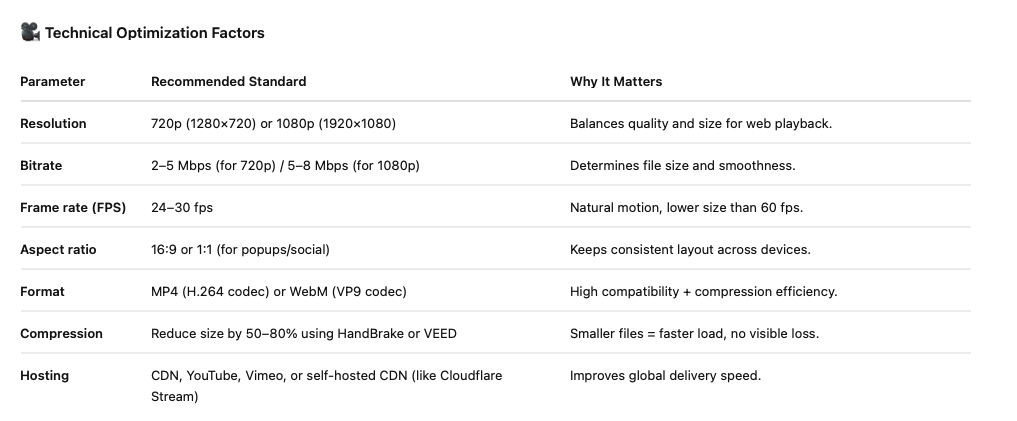
Optimizing Videos Based on Website Placement
Different parts of a website require different video formats, sizes, and strategies. Let’s look at three major use cases 👇
🧱 1. Hero Section Videos
Hero background videos set the mood but can easily bloat your homepage.
- Keep duration under 15 seconds.
- Disable sound by default.
- Use loop + muted autoplay.
- Compress aggressively and use MP4 at 720p.
- Consider a WebP thumbnail fallback for mobile users to reduce bandwidth.
✏️ 2. Blog Post Videos (Educational or Case Studies)
When embedding videos in articles, the goal is engagement — not autoplay.
- Use YouTube or Vimeo embeds for bandwidth efficiency.
- Add a transcript below the video for SEO and accessibility.
- Use schema markup and an attractive thumbnail.
- Apply lazy loading so the video doesn’t block text rendering.
These videos should educate, not distract — so focus on context and clarity.
💬 3. Video Popups or Floating Widgets
Video popups are small, personal, and lightweight. Perfect for conversions.
- Keep files under 2–3 MB and under 30 seconds.
- Use square (1:1) or vertical (9:16) aspect ratios for modern screen compatibility.
- Trigger them after 5–10 seconds or on exit intent, not instantly.
- Optimize them separately — most platforms (like Pathclip.io) compress automatically.
Pro Tip: Use transparent background overlays and a visible mute/unmute toggle for a cleaner experience.
Why B2B and B2C Businesses Need Interactive, Optimized Videos
No matter if you’re a B2B SaaS company or a lifestyle eCommerce brand, people prefer watching over reading. But attention spans are short — and unoptimized videos can ruin the experience before it even starts.
In B2B, optimized videos simplify complexity. Instead of forcing prospects through a 10-minute demo, short embedded clips can show how a product works or highlight key benefits instantly. Video is now a core part of B2B sales enablement — 71% of B2B marketers use it in their strategies (WebFX) — and most report higher conversion rates when videos load quickly and display well on all devices.
In B2C, consumers expect visual storytelling. They want to see a product in motion, not scroll through paragraphs. A Wyzowl report (2025) found that 91% of businesses use video marketing, and 88% say video delivers positive ROI. But here’s the catch — that ROI drops sharply when videos buffer or autoplay poorly.
Optimized video bridges this gap:
- It makes your website faster.
- It ensures consistent quality across desktop and mobile.
- And it helps Google understand your content through structured data, improving SEO visibility.
In short, optimized video is good marketing. It’s how you transform visuals from decoration into measurable business assets.
How to Make Interactive Videos Optimized for Websites
So, how to make interactive videos that perform beautifully on your website? It’s not just about compressing a file — it’s about combining technical and creative optimization.
Here’s how to get it right:
- Use the right file formats.
- Stick to MP4 (H.264) or WebM (VP9). They’re supported across browsers and deliver a great balance of quality and size.
- Compress without losing clarity.
- Use tools like HandBrake, VEED.io, or Adobe Media Encoder to bring file sizes down by 50–80% while keeping quality intact. Aim for 720p or 1080p resolution — not 4K — for most web embeds.
- Host videos externally or via CDN.
- Avoid uploading heavy videos directly to your site host. Instead, use YouTube, Vimeo, Wistia, or your own content delivery network (CDN). External hosting offloads bandwidth and speeds up load times.
- Lazy load your videos.
- Don’t load all videos when the page opens — load them only when a user scrolls near. This improves first contentful paint (FCP) and page speed scores.
- Add captions and transcripts.
- Accessibility matters. Captions make your content usable for everyone and help search engines understand your message.
- Include metadata and schema markup.
- Add descriptive titles, keywords, and VideoObject schema to help Google index your videos. When done right, you can even appear in video-rich snippets.
- Design mobile-first.
- Over 70% of video traffic is mobile. Use responsive embeds and smaller file sizes to ensure smooth playback everywhere.
Steps to Optimize Video for Website (Your Quick Checklist)
- Choose the Right Format:
- Compress Efficiently:
- Host Smart:
- Lazy Load:
- Optimize Metadata:
- Add Video Schema:
- Track & Adjust:
✅ Pro Tip: Always A/B test page versions with and without embedded video. This helps you quantify the lift in engagement and dwell time.
How Optimized Videos Supercharge Your Video Marketing Strategy
Once your videos are optimized, they do more than load fast — they become central to your video marketing engine.
Here’s how:
- Better SEO visibility:
- Google now prioritizes pages with optimized video markup. That means your content can appear in both web and video search results — doubling exposure.
- Improved engagement:
- Wistia data shows users spend 2.6× more time on pages with video. Optimized videos load instantly, reducing bounce and keeping visitors watching.
- Higher conversions:
- HubSpot research reports that adding video to landing pages can increase conversion rates by up to 80%. Pair that with fast playback, and you’ve removed every friction point between interest and action.
- Better analytics for marketing:
- When hosted on platforms like YouTube or Pathclip, you can track watch time, drop-off points, and CTA clicks — turning engagement data into marketing insights.
For B2B, that means shorter sales cycles.
For eCommerce, that means more “add-to-cart” actions.
And for both, it means better storytelling that scales.
Common Mistakes to Avoid When Optimizing Website Videos
Even seasoned marketers make these optimization missteps:
- Uploading large files directly to their CMS.
- It slows the whole site. Always use external hosting or CDNs.
- Over-compressing and killing quality.
- A blurry video can damage brand perception. Always preview after compression.
- Skipping transcripts and schema.
- You miss out on SEO value and accessibility compliance.
- Ignoring mobile testing.
- Many “optimized” videos still stutter on mobile. Always test on multiple devices.
- Auto-playing with sound.
- It frustrates users and increases bounce rate. Use muted auto-play or manual triggers.
By avoiding these pitfalls, you ensure your video content enhances — not hinders — your marketing funnel.
Conclusion: Make Your Website Videos Work Harder
Optimizing your videos isn’t just about faster load times — it’s about smarter communication.
An optimized video enhances user experience, boosts SEO, and supports your wider video marketing strategy.
To recap:
- Compress and host videos efficiently.
- Add metadata, captions, and schema markup.
- Load videos intelligently with lazy loading.
- Monitor and adjust for ongoing performance.
If you treat video like an engine instead of an ornament, it can power the entire user journey — from discovery to conversion.
🎥 Ready to take the next step?
Try creating optimized, interactive video popups with Pathclip.io — the easiest way to add fast, engaging video experiences to your website without writing a single line of code.
Because a static page tells — but an optimized video sells.


